Last FM - Music Banter Music Banter

Go Back   Music Banter > The Music Forums > General Music
Register Blogging Today's Posts
Welcome to Music Banter Forum! Make sure to register - it's free and very quick! You have to register before you can post and participate in our discussions with over 70,000 other registered members. After you create your free account, you will be able to customize many options, you will have the full access to over 1,100,000 posts.

Reply
 
Thread Tools Display Modes
Old 01-19-2013, 09:30 PM   #1 (permalink)
SOPHIE FOREVER
 
Frownland's Avatar
 
Join Date: Aug 2011
Location: East of the Southern North American West
Posts: 35,541
Default

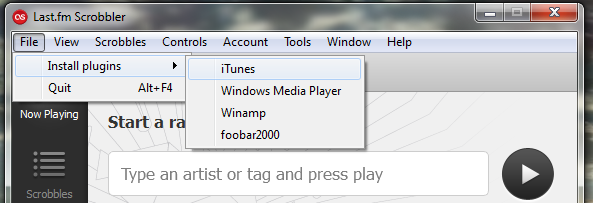
It's not in iTunes, it's the little last.fm window that you can pull up. If you click on the last.fm icon or start an artist/mix/library radio, it'll be in the file tab there.
__________________
Studies show that when a given norm is changed in the face of the unchanging, the remaining contradictions will parallel the truth.

Frownland is offline   Reply With Quote
Old 01-19-2013, 10:23 PM   #2 (permalink)
Mate, Spawn & Die
 
Janszoon's Avatar
 
Join Date: May 2007
Location: The Rapping Community
Posts: 24,593
Default

Quote:
Originally Posted by Frownland View Post
It's not in iTunes, it's the little last.fm window that you can pull up. If you click on the last.fm icon or start an artist/mix/library radio, it'll be in the file tab there.
Are you talking about in the scrobbler application? There's no file tab or file menu item in there for me.
Janszoon is offline   Reply With Quote
Old 01-19-2013, 10:49 PM   #3 (permalink)
The Music Guru.
 
Burning Down's Avatar
 
Join Date: Jun 2009
Location: Beyond the Wall
Posts: 4,858
Default

Quote:
Originally Posted by Janszoon View Post
Are you talking about in the scrobbler application? There's no file tab or file menu item in there for me.
Wait, so you don't have this?

Burning Down is offline   Reply With Quote
Old 01-19-2013, 10:58 PM   #4 (permalink)
Mate, Spawn & Die
 
Janszoon's Avatar
 
Join Date: May 2007
Location: The Rapping Community
Posts: 24,593
Default

Quote:
Originally Posted by Burning Down View Post
Wait, so you don't have this?

Nope. These are my menu items:
  • Last.fm Scrobbler
  • View
  • Scrobbles
  • Controls
  • Account
  • Window
  • Help
None of them contain any options about plug-ins as far as I can tell. Help doesn't even list anything about plug-ins when I search for it. Maybe that's only a Windows thing? I'm running Last.fm Scrobbler 2.1.30 (the newest version of the scrobbler) on MacOS 10.6.8.
Janszoon is offline   Reply With Quote
Old 01-19-2013, 11:42 PM   #5 (permalink)
The Music Guru.
 
Burning Down's Avatar
 
Join Date: Jun 2009
Location: Beyond the Wall
Posts: 4,858
Default

Quote:
Originally Posted by Janszoon View Post
Nope. These are my menu items:
  • Last.fm Scrobbler
  • View
  • Scrobbles
  • Controls
  • Account
  • Window
  • Help
None of them contain any options about plug-ins as far as I can tell. Help doesn't even list anything about plug-ins when I search for it. Maybe that's only a Windows thing? I'm running Last.fm Scrobbler 2.1.30 (the newest version of the scrobbler) on MacOS 10.6.8.
I don't know why they would just stop supporting the plug-in client for Macs or anything like that... they probably just made it harder to find and download. My boyfriend downloaded the new Last FM software earlier today but he hasn't tried scrobbling on it yet. His laptop is also a Mac running 10.6.8 Snow Leopard. I can ask him tomorrow if he has the plug-in or not.
Burning Down is offline   Reply With Quote
Reply


© 2003-2025 Advameg, Inc.